找回密码
 立即注册

QQ登录

只需一步,快速开始

查看: 41484|回复: 29

Arduino入门教程—拓展实验篇九 驱动单色8*8点阵

  [复制链接]

签到天数: 868 天

[LV.10]以坛为家III

发表于 2013-8-18 15:21:31 | 显示全部楼层 |阅读模式
驱动单色8*8点阵

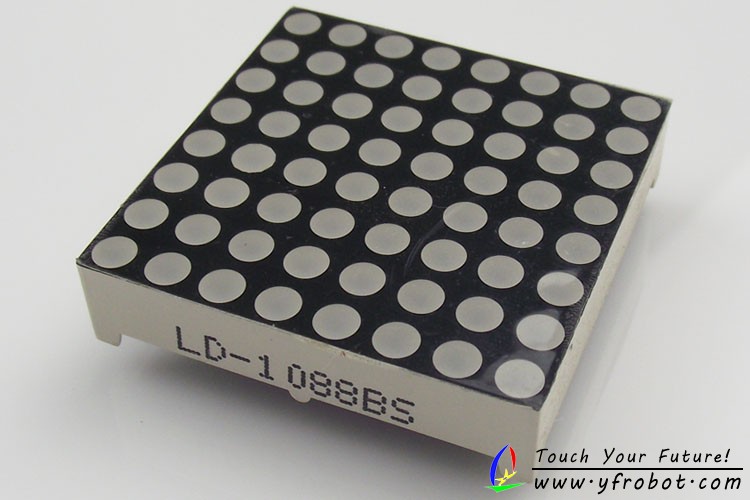
本次实验使用Arduino 控制器直接驱动一个单色的8*8点阵,所用点阵型号为LD-1088BS,如下图:

点阵图片.jpg
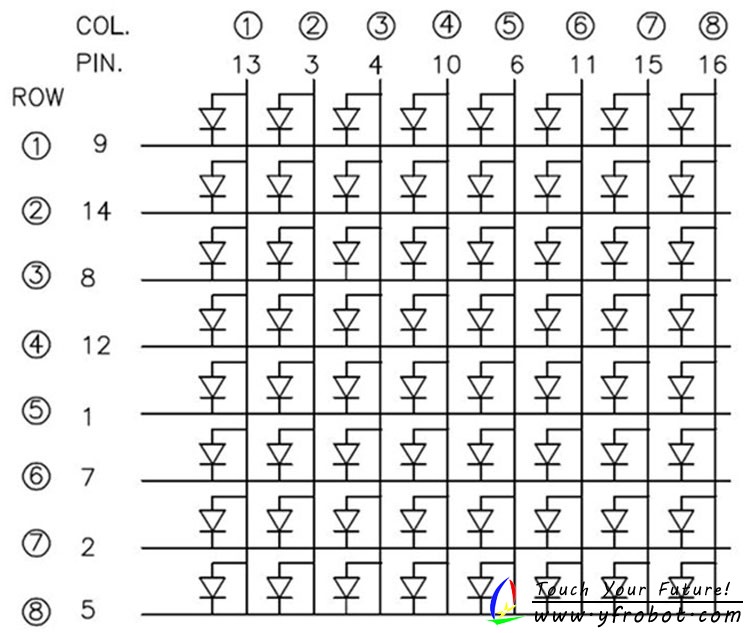
内部原理图:
LED dot matrix.jpg
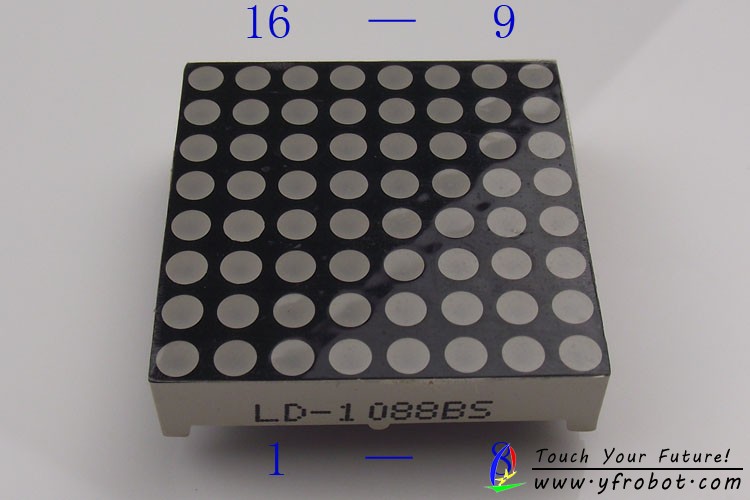
实际引脚编号:
实际引脚编号.jpg
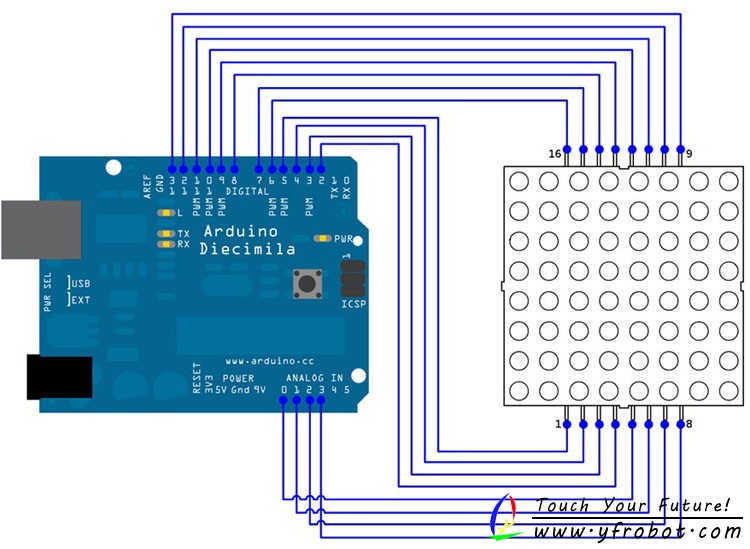
Arduino连接图:
点阵电路图.jpg

程序所用扩文件:

FrequencyTimer2.zip (4.55 KB, 下载次数: 942)


例程:
[C] 纯文本查看 复制代码
/*
* Show messages on an 8x8 led matrix,
* scrolling from right to left.
*
* Uses FrequencyTimer2 library to
* constantly run an interrupt routine
* at a specified frequency. This
* refreshes the display without the
* main loop having to do anything.
*
*/

#include <FrequencyTimer2.h>

#define SPACE { \
    {0, 0, 0, 0, 0, 0, 0, 0},  \
    {0, 0, 0, 0, 0, 0, 0, 0}, \
    {0, 0, 0, 0, 0, 0, 0, 0}, \
    {0, 0, 0, 0, 0, 0, 0, 0}, \
    {0, 0, 0, 0, 0, 0, 0, 0}, \
    {0, 0, 0, 0, 0, 0, 0, 0}, \
    {0, 0, 0, 0, 0, 0, 0, 0}, \
    {0, 0, 0, 0, 0, 0, 0, 0} \
}

#define H { \
    {0, 1, 0, 0, 0, 0, 1, 0}, \
    {0, 1, 0, 0, 0, 0, 1, 0}, \
    {0, 1, 0, 0, 0, 0, 1, 0}, \
    {0, 1, 1, 1, 1, 1, 1, 0}, \
    {0, 1, 0, 0, 0, 0, 1, 0}, \
    {0, 1, 0, 0, 0, 0, 1, 0}, \
    {0, 1, 0, 0, 0, 0, 1, 0}, \
    {0, 1, 0, 0, 0, 0, 1, 0}  \
}

#define E  { \
    {0, 1, 1, 1, 1, 1, 1, 0}, \
    {0, 1, 0, 0, 0, 0, 0, 0}, \
    {0, 1, 0, 0, 0, 0, 0, 0}, \
    {0, 1, 1, 1, 1, 1, 1, 0}, \
    {0, 1, 0, 0, 0, 0, 0, 0}, \
    {0, 1, 0, 0, 0, 0, 0, 0}, \
    {0, 1, 0, 0, 0, 0, 0, 0}, \
    {0, 1, 1, 1, 1, 1, 1, 0}  \
}

#define L { \
    {0, 1, 0, 0, 0, 0, 0, 0}, \
    {0, 1, 0, 0, 0, 0, 0, 0}, \
    {0, 1, 0, 0, 0, 0, 0, 0}, \
    {0, 1, 0, 0, 0, 0, 0, 0}, \
    {0, 1, 0, 0, 0, 0, 0, 0}, \
    {0, 1, 0, 0, 0, 0, 0, 0}, \
    {0, 1, 0, 0, 0, 0, 0, 0}, \
    {0, 1, 1, 1, 1, 1, 1, 0}  \
}

#define O { \
    {0, 0, 0, 1, 1, 0, 0, 0}, \
    {0, 0, 1, 0, 0, 1, 0, 0}, \
    {0, 1, 0, 0, 0, 0, 1, 0}, \
    {0, 1, 0, 0, 0, 0, 1, 0}, \
    {0, 1, 0, 0, 0, 0, 1, 0}, \
    {0, 1, 0, 0, 0, 0, 1, 0}, \
    {0, 0, 1, 0, 0, 1, 0, 0}, \
    {0, 0, 0, 1, 1, 0, 0, 0}  \
}

byte col = 0;
byte leds[8][8];

// pin[xx] on led matrix connected to nn on Arduino (-1 is dummy to make array start at pos 1)
int pins[17]= {-1, 5, 4, 3, 2, 14, 15, 16, 17,13, 12, 11, 10, 9, 8, 7, 6, };

// col[xx] of leds = pin yy on led matrix
int rows[8] = {pins[16], pins[15], pins[11], pins[6], pins[10], pins[4], pins[3], pins[13]};

// row[xx] of leds = pin yy on led matrix
int cols[8] = {pins[9], pins[14], pins[8], pins[12], pins[1], pins[7], pins[2], pins[5]};

const int numPatterns = 6;
byte patterns[numPatterns][8][8] = {
  H,E,L,L,O,SPACE
};

int pattern = 0;

void setup() {
  // sets the pins as output
  for (int i = 1; i <= 16; i++) {
    pinMode(pins[i], OUTPUT);
  }

  // set up cols and rows
  for (int i = 1; i <= 8; i++) {
    digitalWrite(cols[i - 1], LOW);
  }

  for (int i = 1; i <= 8; i++) {
    digitalWrite(rows[i - 1], LOW);
  }

  clearLeds();

  // Turn off toggling of pin 11
  FrequencyTimer2::disable();
  // Set refresh rate (interrupt timeout period)
  FrequencyTimer2::setPeriod(2000);
  // Set interrupt routine to be called
  FrequencyTimer2::setOnOverflow(display);

  setPattern(pattern);
}

void loop() {
    pattern = ++pattern % numPatterns;
    slidePattern(pattern, 60);
}

void clearLeds() {
  // Clear display array
  for (int i = 0; i < 8; i++) {
    for (int j = 0; j < 8; j++) {
      leds[i][j] = 0;
    }
  }
}

void setPattern(int pattern) {
  for (int i = 0; i < 8; i++) {
    for (int j = 0; j < 8; j++) {
      leds[i][j] = patterns[pattern][i][j];
    }
  }
}

void slidePattern(int pattern, int del) {
  for (int l = 0; l < 8; l++) {
    for (int i = 0; i < 7; i++) {
      for (int j = 0; j < 8; j++) {
        leds[j][i] = leds[j][i+1];
      }
    }
    for (int j = 0; j < 8; j++) {
      leds[j][7] = patterns[pattern][j][0 + l];
    }
    delay(del);
  }
}

// Interrupt routine
void display() {
  digitalWrite(cols[col], LOW);  // Turn whole previous column off
  col++;
  if (col == 8) {
    col = 0;
  }
  for (int row = 0; row < 8; row++) {
    if (leds[col][7 - row] == 1) {
      digitalWrite(rows[row], LOW);  // Turn on this led
    }
    else {
      digitalWrite(rows[row], HIGH); // Turn off this led
    }
  }
  digitalWrite(cols[col], HIGH); // Turn whole column on at once (for equal lighting times)
}


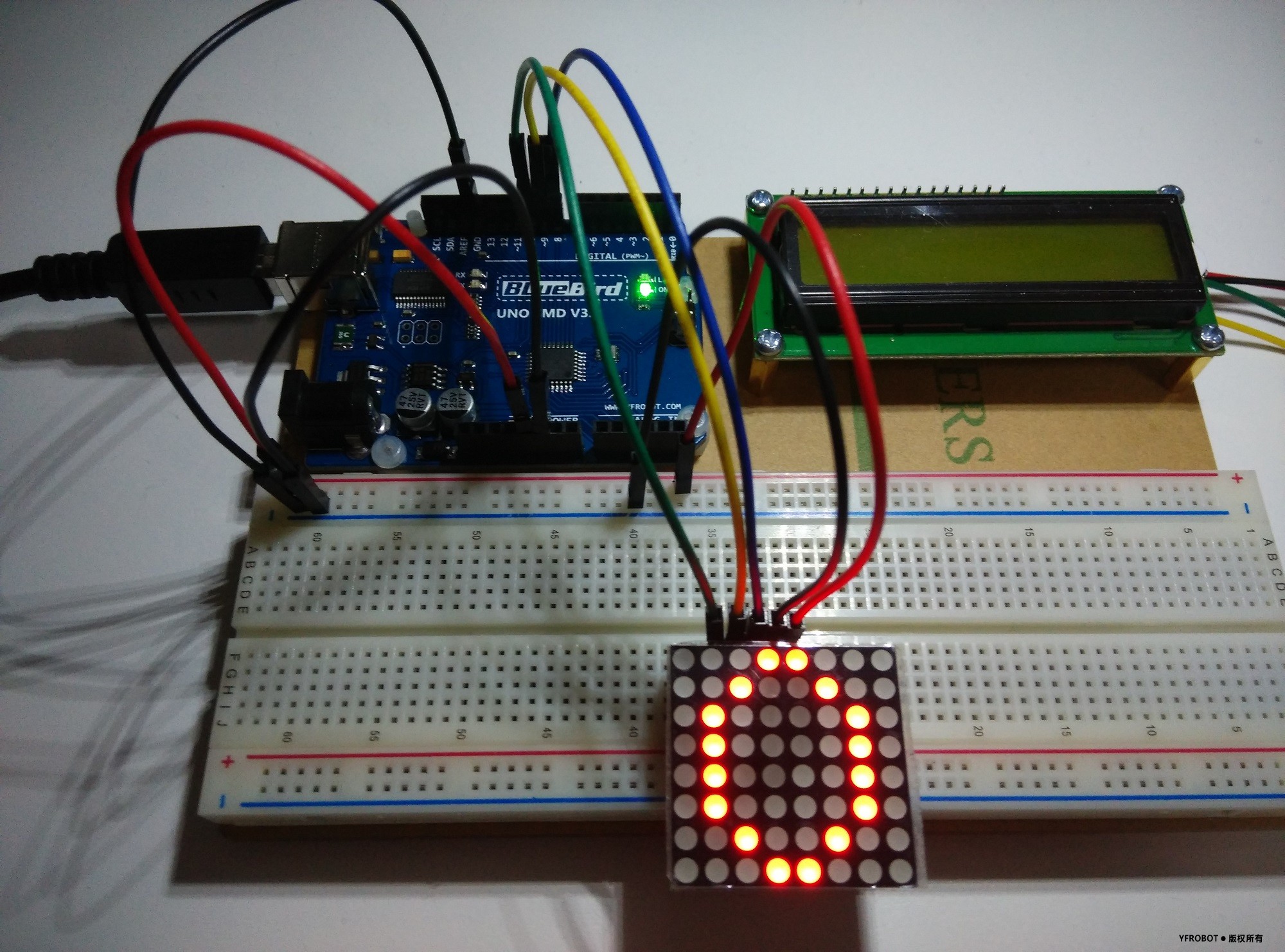
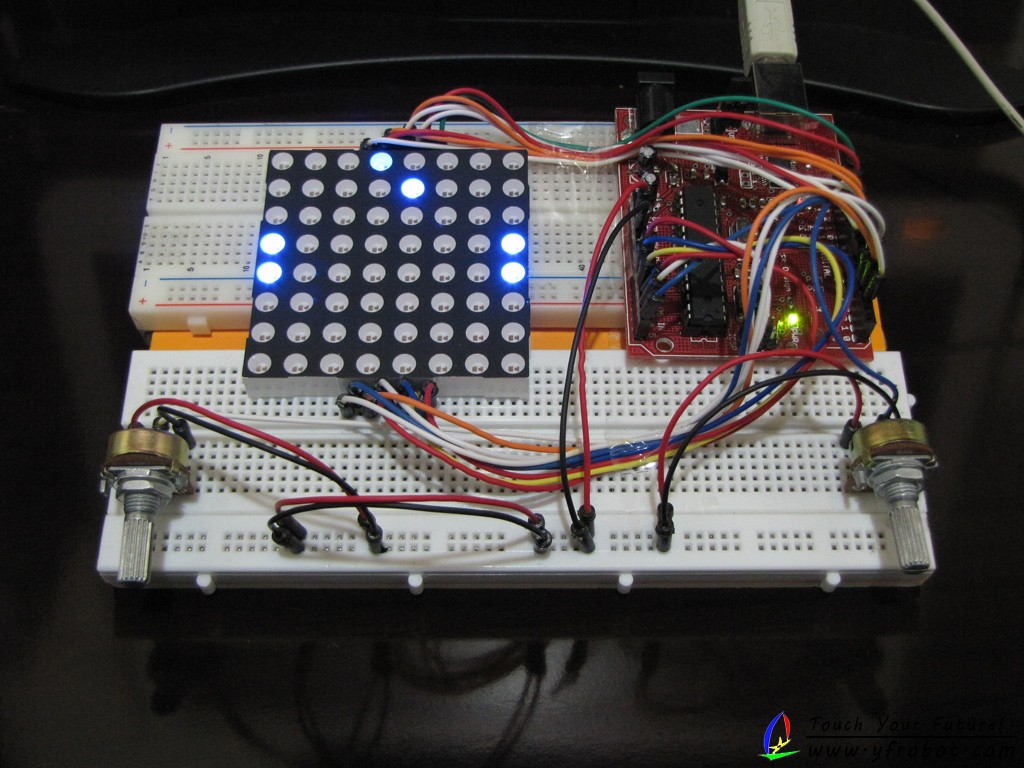
显示图片为“HELLO ”滚动显示!

Arduino直接驱动8*8点阵占用的I/O口太多,所以建议大家使用芯片驱动8*8点阵,例如74HC595或者MAX7129芯片!!

下面也为大家提供一些IC资料,有兴趣的可以研究研究~~

74HC595中文资料: 74HC595的中文版资料.pdf (2.11 MB, 下载次数: 2919)
MAX7129中文资料: MAX7219中文资料.pdf (3.04 MB, 下载次数: 2274)
MAX7129英文资料: MAX7219英文资料.pdf (742.57 KB, 下载次数: 92)


本帖被以下淘专辑推荐:

签到天数: 1 天

[LV.1]初来乍到

发表于 2015-7-22 02:23:08 | 显示全部楼层
我补一个驱动5针LED的例子
D:\Documents\Bluetooth Folder\IMG_20150722_021849.jpg
[C++] 纯文本查看 复制代码
#include <FrequencyTimer2.h>

#define NOP() do { __asm__ __volatile__ ("nop"); } while (0)
#define _countof(a)		(sizeof(a) / sizeof(a[0]))

class HC595LED
{
public:
	HC595LED(int ser, int rck, int srck)
	{
		_SER = ser;
		_RCK = rck;
		_SRCK = srck;
	}
	
	void begin()
	{
		pinMode(_SER, OUTPUT);
		pinMode(_RCK, OUTPUT);
		pinMode(_SRCK, OUTPUT);

		digitalWrite(_SER, LOW);
		digitalWrite(_RCK, LOW);
		digitalWrite(_SRCK, LOW);
	}

	void displayRow(uint8_t nRow, uint8_t data)
	{
		nRow = 7 - nRow;

		for(int i = 0; i < 8; i++)
			_rowEnable(i == nRow);
		for(int i = 7; i >= 0; i--) {
			_colEnable(bitRead(data, i));
		}
		flushScreen();
	}

	void clear()
	{
		for(int i = 0; i < 8; i++) 
			_rowEnable(false);
		for(int i = 0; i < 8; i++)
			_colEnable(false);
	}

	void writeItem(bool bHigh)
	{
		digitalWrite(_SER, bHigh ? HIGH : LOW);
		_flushItem();
	}

	void flushScreen()
	{
		digitalWrite(_RCK, HIGH);
		NOP();
		NOP();
		digitalWrite(_RCK, LOW);
	}
private:
	void _rowEnable(bool bEnable)
	{
		writeItem(!bEnable);
	}
	void _colEnable(bool bEnable)
	{
		writeItem(bEnable);
	}

	void _flushItem()
	{
		digitalWrite(_SRCK, HIGH);
		NOP();
		NOP();
		digitalWrite(_SRCK, LOW);
	}

private:
	int _SER;
	int _RCK;
	int _SRCK;
};

///////////////////////////////////////////////////////////////////////

//Pin connected to DS of 74HC595
const int SER_PIN = 8;
//Pin connected to ST_CP of 74HC595
const int RCK_PIN = 9;
//Pin connected to SH_CP of 74HC595
const int SRCK_PIN = 10;

HC595LED led(SER_PIN, RCK_PIN, SRCK_PIN);

PROGMEM const char SPACE[] = 
{
	0b00000000,
	0b00000000,
	0b00000000,
	0b00000000,
	0b00000000,
	0b00000000,
	0b00000000,
	0b00000000,
};
PROGMEM const char H[] = 
{
	0b01000010,
	0b01000010,
	0b01000010,
	0b01111110,
	0b01000010,
	0b01000010,
	0b01000010,
	0b01000010,
};
PROGMEM const char E[] = 
{
	0b01111110,
	0b01000000,
	0b01000000,
	0b01111110,
	0b01000000,
	0b01000000,
	0b01000000,
	0b01111110,
};
PROGMEM const char L[] = 
{
	0b01000000,
	0b01000000,
	0b01000000,
	0b01000000,
	0b01000000,
	0b01000000,
	0b01000000,
	0b01111110,
};
PROGMEM const char O[] = 
{
	0b00011000,
	0b00100100,
	0b01000010,
	0b01000010,
	0b01000010,
	0b01000010,
	0b00100100,
	0b00011000,
};

const char * const arrShowData[] = {H, E, L, L, O, SPACE};

char arrShowBuffer[] = 
{
	0, 0, 0, 0, 0, 0, 0, 0,
};
void display()
{
	static int s_nIndex = 0;

	led.displayRow(s_nIndex, arrShowBuffer[s_nIndex]);

	s_nIndex++;
	s_nIndex %= 8;
}

void setup() 
{
	led.begin();
    Serial.begin(9600);

    delay(1000);
	led.clear();

	FrequencyTimer2::disable();
	FrequencyTimer2::setPeriod(2000);
	FrequencyTimer2::setOnOverflow(display);
}

void loop() 
{
	int s_nIndex = 0;

	while(true) {
		noInterrupts();
		memcpy_PF(arrShowBuffer, (uint_farptr_t)arrShowData[s_nIndex], sizeof(arrShowBuffer));
		interrupts();

		s_nIndex++;
		s_nIndex %= _countof(arrShowData);

		delay(2000);
	}
}

回复 支持 2 反对 0

使用道具 举报

签到天数: 1 天

[LV.1]初来乍到

发表于 2015-7-22 21:30:03 | 显示全部楼层
IMG_20150722_021849.jpg
这是连线方法和动行效果

回复 支持 1 反对 0

使用道具 举报

签到天数: 2 天

[LV.1]初来乍到

发表于 2014-11-2 00:08:42 | 显示全部楼层
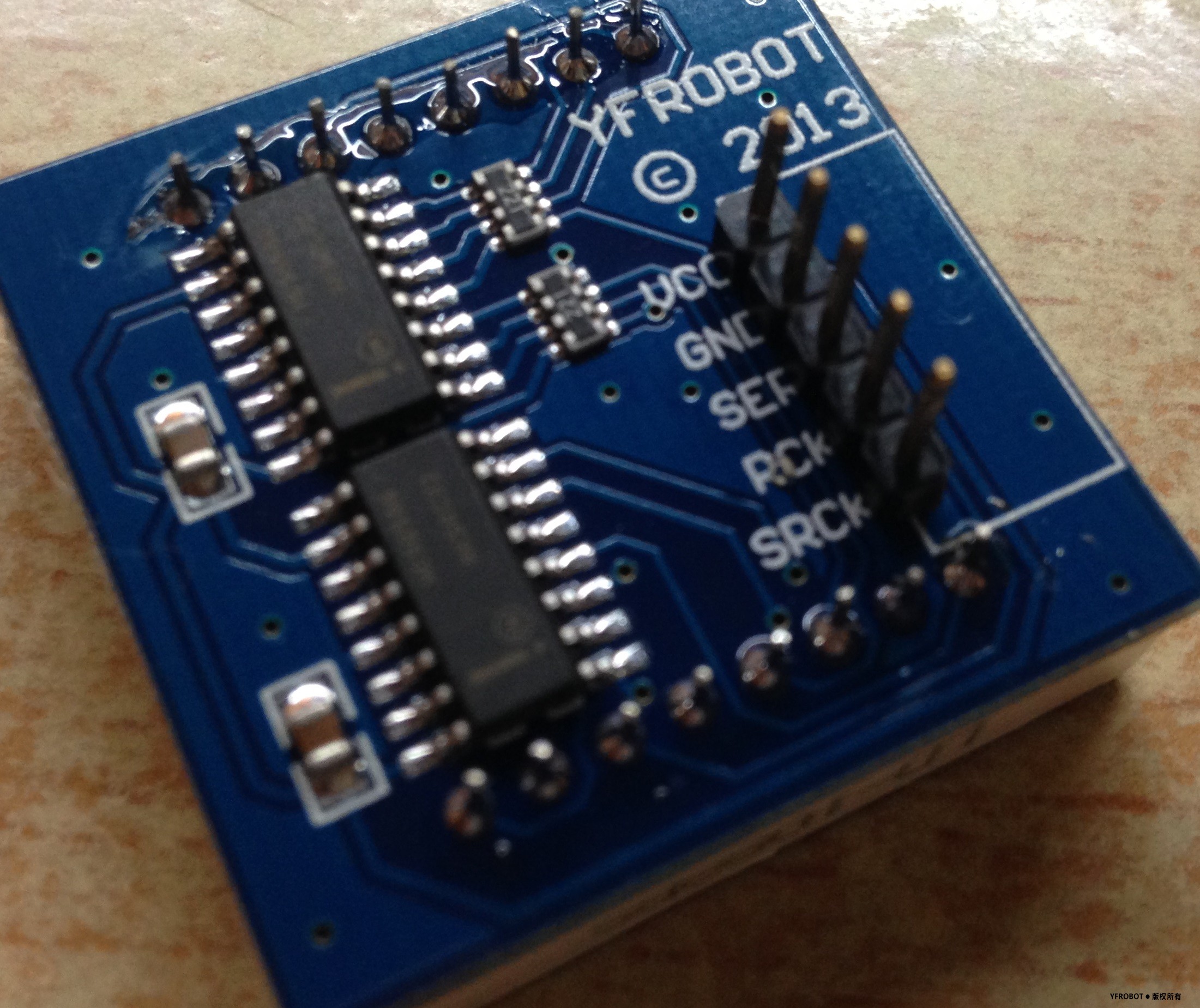
8*8点阵 反面5根针的 不明白 怎么弄。。。求救。。
回复 支持 1 反对 0

使用道具 举报

该用户从未签到

发表于 2013-8-19 23:34:47 | 显示全部楼层
代码有误呀==
回复 支持 反对

使用道具 举报

签到天数: 868 天

[LV.10]以坛为家III

 楼主| 发表于 2013-8-20 08:40:14 | 显示全部楼层
回复 支持 反对

使用道具 举报

该用户从未签到

发表于 2013-10-13 20:56:07 | 显示全部楼层
5555,我的YFrobot套件中的单色点阵型号是LD-1088BHG,上下各12个针脚,怎么安啊-_-#

点评

你的应该是双色点阵,UNO的I/O口都不够咯。。需要连接芯片了  发表于 2013-10-15 19:19
回复 支持 反对

使用道具 举报

签到天数: 868 天

[LV.10]以坛为家III

 楼主| 发表于 2013-10-16 10:04:19 | 显示全部楼层
http://blog.bsoares.com.br/arduino/ping-pong-with-8x8-led-matrix-on-arduino
pong-with-8x8-led-matrix-on-arduino-4.jpg
程序下载:
ping_pang.zip (1.74 KB, 下载次数: 128)
回复 支持 反对

使用道具 举报

该用户从未签到

发表于 2014-1-7 21:11:41 | 显示全部楼层
不错不错,学习一下
回复 支持 反对

使用道具 举报

签到天数: 6 天

[LV.2]偶尔看看I

发表于 2014-9-18 22:28:09 | 显示全部楼层
求问我这个反面5根针的怎么插? 有例程吗?
IMG_0945.JPG
回复 支持 反对

使用道具 举报

签到天数: 868 天

[LV.10]以坛为家III

 楼主| 发表于 2014-9-19 18:02:31 | 显示全部楼层
zjjdog3 发表于 2014-9-18 22:28
求问我这个反面5根针的怎么插? 有例程吗?

根据你的程序来接线:
  1. //Pin connected to DS of 74HC595
  2. int SER = 9;
  3. //Pin connected to ST_CP of 74HC595
  4. int RCK  = 10;
  5. //Pin connected to SH_CP of 74HC595
  6. int SRCK  = 11;
复制代码
回复 支持 反对

使用道具 举报

该用户从未签到

发表于 2015-4-13 22:35:06 | 显示全部楼层
AllBlue 发表于 2014-9-19 18:02
根据你的程序来接线:

怎么弄啊,能不能详细点
回复 支持 反对

使用道具 举报

您需要登录后才可以回帖 登录 | 立即注册

本版积分规则

QQ|手机版|小黑屋|联系我们|YFROBOT ( 苏ICP备20009901号-2 )

GMT+8, 2025-12-18 14:33 , Processed in 0.254940 second(s), 28 queries .

Powered by Discuz! X3.5

© 2001-2025 Discuz! Team.

快速回复 返回顶部 返回列表